Yet Another ... VimIDE
A lightweight Python IDE built on Vim and tmux. VimIDE turns Vim into a multi-panel development environment with integrated IPython, AI assistance, LaTeX support, and a terminal console — all inside a persistent tmux session.
Documentation: https://francesco-mannella.github.io/vimide/
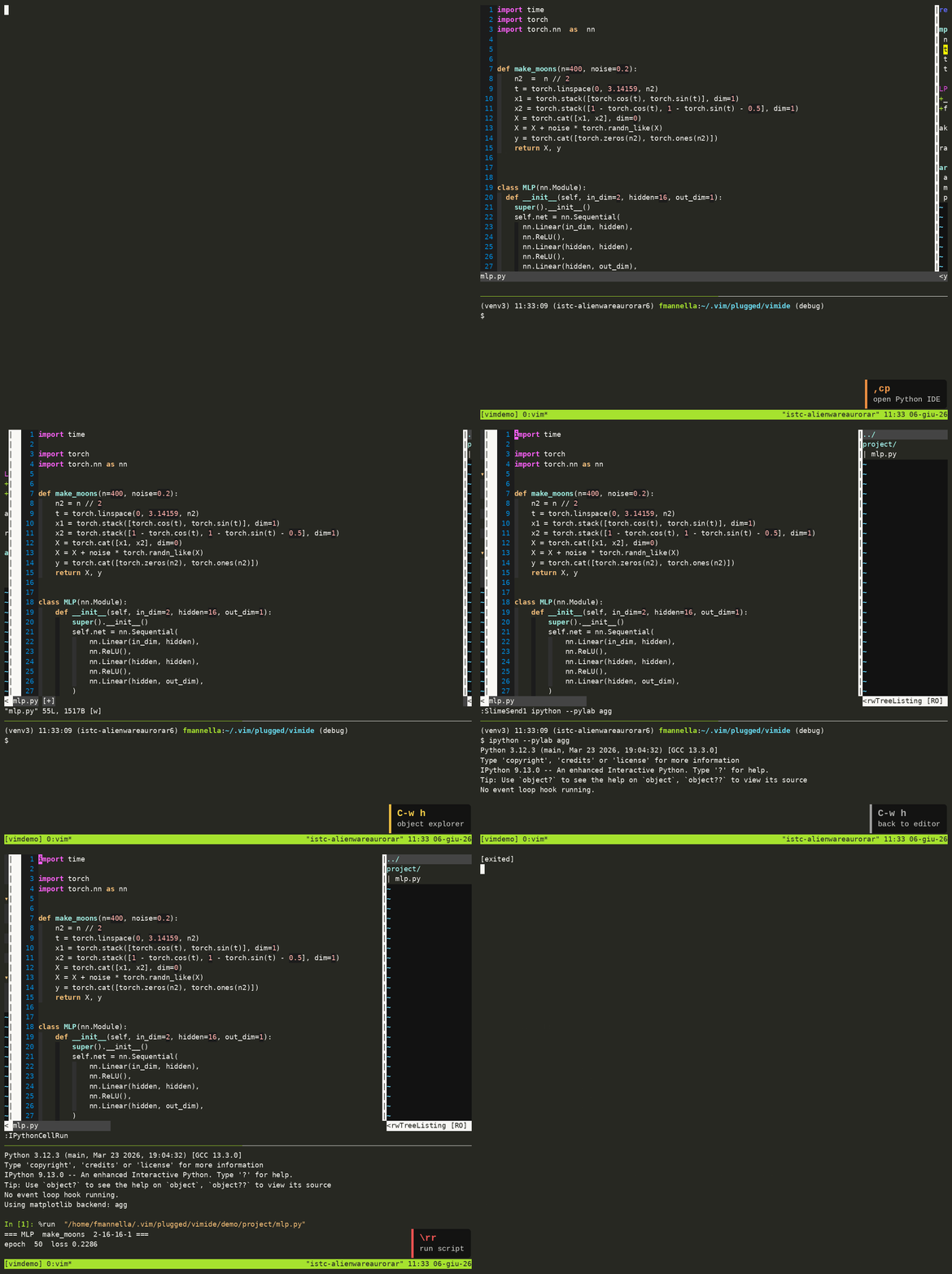
Table of Contents
- Overview
- Layout
- Installation
- The
videLauncher - tmux Configuration
- IDE Shortcuts
- Python Features
- IPython Integration
- Code Cells
- Linting and Fixing (ALE)
- Jupyter Notebook Support
- LaTeX Features
- AI Integration
- General Editor Features
- Color Schemes
- Installed Plugins
- Repository Structure
Overview
VimIDE is a Vim plugin plus a launcher script (vide) that sets up a full development environment:
- Vim runs in the top pane of a tmux window named
code, with a three-panel layout: tag browser, editor, file explorer. - IPython runs in the bottom pane, linked to the editor via vim-slime.
- Code cells, selections, or full scripts can be sent from the editor to IPython with single keystrokes.
- ALE provides async linting (flake8 + mypy via pylsp) and auto-fixing (black, isort, autoimport).
- vim-ai provides AI text and code assistance through OpenRouter.
Layout
--------------------------------------------------------------------
|                |                      |                          |
|    Tagbar      |      Editor          |      File Explorer       |
|                |                      |                          |
--------------------------------------------------------------------
|                    IPython console (bottom pane)                 |
--------------------------------------------------------------------
The Tagbar and file explorer panels collapse to minimal width when unfocused and expand on entry, keeping the editor at maximum width during editing.
Within the Tagbar:
- Double-click or <Return>: jump to the function/class/method definition.
Installation
Before running the installer, provision the OpenRouter token:
mkdir -p ~/.config/ai
echo "sk-or-..." > ~/.config/ai/openrouter.token
chmod 600 ~/.config/ai/openrouter.token
Then run:
./install.sh
The installer:
- Installs vim-plug if absent.
- Backs up and replaces
~/.vimrcwithscripts/vimrc. - Backs up and replaces
~/.tmux.confwithscripts/tmux.conf. - Installs/updates all Vim plugins via vim-plug.
- Copies
scripts/roles.inito~/.config/ai/roles.ini. - Copies
scripts/CLAUDE.mdto~/.claude/CLAUDE.md. - Installs Python tools:
ipynb-py-convert,notedown(via uv). - Installs system packages:
tmux,universal-ctags. - Copies
scripts/videto~/bin/videand adds~/bintoPATH. - Adds a
vim --servername vimalias to.bashrc. - Adds SSH auth and DISPLAY tracking fix for tmux sessions.
Each replaced file is saved as <file>.orig before overwriting, so the original can be restored.
Uninstall
./install.sh -u
The uninstaller:
- Restores each
.origbackup (~/.vimrc,~/.tmux.conf,~/.config/ai/roles.ini,~/.claude/CLAUDE.md,~/.claude/settings.json) if it exists, otherwise removes the installed file. - Removes
~/bin/vide. - Removes the three additions made to
~/.bashrc: thePATHentry, thealias vimline, and the SSH/DISPLAY snippet.
Vim plugins and system packages (tmux, universal-ctags) are not removed.
LaTeX support
To also install system-level LaTeX dependencies:
./install.sh -l
Installs: texlive-latex-base, texlive-latex-recommended, latexmk, okular.
The Vim side (vimtex plugin, after/ftplugin/tex.vim) is always included in the base install.
The vide Launcher
vide manages named tmux sessions containing the IDE. It is installed to ~/bin/vide.
vide -n NAME        Start or reattach a session named NAME
vide -q NAME        Terminate the session named NAME
vide -l             List all active vide sessions
vide -d DIR         Set the working directory (default: current directory)
vide -h             Show help
On first launch, vide:
- Creates a detached tmux session
vide_NAMEwith windowcode, split into two panes: top (Vim, 75%) and bottom (console, 25%). - Starts Vim in the top pane. If a file under the working directory matches
NAME(case-insensitive), callsRunIDE()with its path to open it directly; otherwise callsRunIDE()with no argument, which opens a file namedmainif one exists, or the first.py/.texfile found. Also configures vim-slime to target the bottom console pane. - Attaches to the session with focus on the top pane.
tmux session: vide_NAME
└── window: code
    ├── pane 0 (top, 75%)
    │   ┌─────────────┬───────────────────┬───────────────────┐
    │   │   Tagbar    │      Editor       │   File Explorer   │
    │   └─────────────┴───────────────────┴───────────────────┘
    └── pane 1 (bottom, 25%)
        ┌───────────────────────────────────────────────────────┐
        │                   IPython console                     │
        └───────────────────────────────────────────────────────┘
tmux Configuration
scripts/tmux.conf (installed to ~/.tmux.conf) sets:
- Terminal:
screen-256colorwith true-color overrides for xterm-compatible terminals. - Prefix key:
Ctrl-a(replaces the defaultCtrl-b). - Message display time: 0 ms (messages dismissed immediately).
- Mouse: enabled.
IDE Shortcuts
Provided by plugin/vimide.vim. Active in all buffers (normal mode).
| Key | Action |
|---|---|
,cp |
Open or reset the IDE layout (Tagbar + Editor + File Explorer) |
,cf |
Find all occurrences of the word under cursor; display in editor |
,cg |
Jump to the file and line of the occurrence under cursor (use inside find list) |
,cr |
Write back edits made in the find list to their source files |
,cu |
Refresh the file explorer |
,cm |
Fetch available free models from OpenRouter and select one as default |
,f |
Open the file path under cursor in the editor window |
Find and replace workflow
,cf— searches.py,.tex,.cpp,.h,.hppfiles under the working directory for the word under cursor. Results appear in the editor in a structured list.- Edit lines in the list to change text in-place.
,cr— writes the modified lines back to their source files.,cg— jump directly to the file and line of the result under cursor.
Python Features
Provided by after/ftplugin/python.vim. Active in Python buffers only.
IPython Integration
Requires vim-slime configured to target the bottom console pane (done automatically by vide).
| Key | Mode | Action |
|---|---|---|
\ss |
normal | Start IPython (Qt backend) in the console pane |
\as |
normal | Start IPython (Agg backend, non-interactive) |
\hh |
normal | Send current line to IPython |
\hh |
visual | Send selection to IPython |
\aa |
normal | Send current line to IPython and advance cursor |
\aa |
visual | Send selection to IPython and advance cursor |
\rr |
normal | Run the entire script (%run) |
\RR |
normal | Run the entire script and report execution time |
\dd |
normal | Start debugger (%run -d) on the current script |
\qq |
normal | Exit debug mode or IPython |
\QQ |
normal | Restart IPython |
\hh and \aa include a guard: if IPython is not at an empty prompt (i.e., currently executing something), the send is blocked and a warning is shown. This prevents accidentally queueing input into a running computation.
Code Cells
Cells are delimited by # %% or #%% markers (Jupyter percent format).
| Key | Mode | Action |
|---|---|---|
\cc |
normal | Execute the current cell |
\vv |
normal | Execute the current cell verbosely, then jump to next cell |
\ll |
normal | Clear console, execute current cell, jump to next cell |
\LL |
normal | Clear the IPython console |
\xx |
normal | Close all Matplotlib figure windows |
[c |
normal | Jump to previous cell header |
]c |
normal | Jump to next cell header |
F9 |
normal/insert | Insert a new cell header above, enter insert mode |
F10 |
normal/insert | Insert a new cell header below, enter insert mode |
Linting and Fixing (ALE)
Active in Python buffers (buffer-local mappings).
| Key | Action |
|---|---|
Ctrl-k |
Jump to previous lint error (wrapping) |
Ctrl-j |
Jump to next lint error (wrapping) |
Ctrl-f |
Auto-fix the file (black, isort, autoimport) |
Ctrl-h |
Show hover documentation at cursor |
Ctrl-x |
Close the ALE hover/preview window |
Linters: pylsp (flake8 backend, ignoring E203/E501/W503; mypy with dmypy) and jedils.
Fixers: black (line length 90), isort, autoimport.
Note on terminal key handling: with screen-256color, Ctrl-h and <BS> share the same byte (0x08). Both keys are mapped to hover to ensure the binding fires regardless of how the terminal encodes the keypress.
Jupyter Notebook Support
Python files are treated as Jupytext percent-format notebooks (py:percent). Saving a .py file automatically updates the paired .ipynb via jupytext.
LaTeX Features
Provided by after/ftplugin/tex.vim via vimtex.
- Compiler:
latexmkwith bibtex, synctex, shell-escape, and non-stop mode. - PDF viewer: Okular with forward/inverse search via synctex.
- Spell checking: enabled (en_us), with a custom word list at
spell/dict.utf-8.add. §: reformats indentation of selected LaTeX comment blocks.- ALE: disabled per-buffer (
b:ale_enabled = 0) to avoid interference with vimtex. F9(insert mode): trigger LaTeX completion.- Quickfix suppresses: Underfull, Overfull, Font, Float, Difference warnings.
- All folds open by default (
foldlevelstart=99).
AI Integration
Provided by vim-ai with roles defined in ~/.config/ai/roles.ini. Most roles route through OpenRouter using a token at ~/.config/ai/openrouter.token; claudecode/cc are the exception (see below).
Use ,cm to dynamically fetch currently available free models from OpenRouter and set one as the default.
Model Roles
Select a specific backend by passing the role name to vim-ai commands.
| Role | Model |
|---|---|
default |
openrouter/free, or the local claude CLI if detected at install time — see Claude Code Provider |
gemini |
google/gemini-3-flash-preview |
gpt |
openai/gpt-4o |
gpt5 |
gpt-5.4 |
claude |
anthropic/claude-3.5-sonnet |
opus |
anthropic/claude-opus-4.6 |
claudecode, cc |
Local claude CLI, billed to your Claude Pro/Max subscription instead of OpenRouter — see Claude Code Provider |
Claude Code Provider
claudecode (alias cc) shells out to the local, already-authenticated claude CLI (vimide/py/claude_code.py) instead of proxying through OpenRouter, so usage is billed against your Claude Pro/Max subscription rather than metered API tokens.
Requires the claude CLI installed and logged in (claude auth login) — installing and authenticating the CLI itself is a host-machine prerequisite install.sh doesn't manage, similar to the LaTeX system dependencies for vimtex.
:AIChat /cc
<selection> :AIEdit /cc fix the bug
scripts/roles.ini keeps both configs for the default role as alternate section headers, one active and one commented out ([default]/#[free], and [claudecode]/#[default]). If claude is already installed and logged in at install time, install.sh swaps which header is active in the deployed ~/.config/ai/roles.ini, so plain :AIChat/:AIEdit/:AI route through claudecode by default and the OpenRouter config becomes reachable as free. Otherwise default stays on OpenRouter and claudecode/cc remain the explicit opt-in.
Prompt Roles
Text and code transforms applied to the current selection using the default model.
| Role | Purpose |
|---|---|
refine |
Rewrite and improve text for clarity and flow |
translate |
Translate text to English |
professional |
Rewrite in a professional, expert tone |
simplify |
Simplify language, avoid jargon |
clarity |
Make text direct and unambiguous |
code |
Improve and format code (79-char line limit) |
refactor |
Refactor for clarity and maintainability |
optimize |
Optimize for speed and memory |
comment |
Add comments and docstrings |
enhance-docstring |
Rewrite docstrings in Google format |
enhance-comments |
Add and improve inline comments and docstrings |
reformat-comments |
Reformat comments to fit within 79 characters |
General Editor Features
Commenting
Works across file types (Python, Bash, C/C++, TeX, Vim, etc.).
| Key | Action |
|---|---|
zc |
Comment selected lines |
zv |
Uncomment selected lines |
Git Grep
| Key | Action |
|---|---|
\g |
Git grep whole-word for the word under cursor |
\t |
Return to previous location after a grep jump |
:GG |
Git grep (arbitrary pattern) |
:GGw |
Git grep whole-word |
:GGi |
Git grep case-insensitive |
Clipboard
Requires xclip.
| Key | Action |
|---|---|
ay |
Yank selection to system clipboard |
ap |
Paste from system clipboard |
Markdown
| Key | Action |
|---|---|
\mm |
Add HTML anchor tags to headings in the selected range (visual mode) |
Live preview with MathJax support via vim-instant-markdown (opens in browser on save).
Miscellaneous
| Feature | Detail |
|---|---|
:Bdi |
Close all hidden (non-visible) buffers |
| Auto-save | Saves all buffers on focus lost |
| Indent guides | Alternating dark stripes every 4 spaces |
| Mark visualization | Marks shown in sign column (vim-signature) |
| Directory diff | :DirDiff via vim-dirdiff |
| Line numbers | Always on |
| Search | Smart case-insensitive (ignorecase + smartcase) |
| Indentation | 4 spaces, expandtab, for all files |
| Wrap navigation | Up/Down move by display lines (gk/gj) |
| Shell slime | \hh/\aa send lines/regions to console in bash buffers too |
Color Schemes
Bundled in colors/:
| Scheme | Description |
|---|---|
late_evening |
Default dark scheme (active) |
blackdust |
Dark with subtle tones |
calmar256-dark |
256-color dark |
calmar256-light |
256-color light |
corporation |
High-contrast dark |
Installed Plugins
| Plugin | Purpose |
|---|---|
| vim-vinegar | Enhanced netrw file explorer |
| vimtex | LaTeX editing and compilation |
| jedi-vim | Python autocompletion |
| ale | Async linting and fixing |
| tagbar | Tag/symbol browser |
| jupytext.vim | Jupyter notebook / percent-format sync |
| vim-dirdiff | Directory diff |
| vim-ipynb | Jupyter notebook support |
| vim-slime | Send code to a terminal multiplexer pane |
| vim-ipython-cell | Cell-based IPython execution |
| vim-signature | Visual mark management |
| vim-sh-heredoc-highlighting | Heredoc syntax in shell files |
| vim-ai | AI text and code assistance |
| vim-sh | Improved shell script syntax |
| traces.vim | Live preview of :s substitutions |
| vim-instant-markdown | Live Markdown preview in browser |
| loremipsum | Lorem ipsum generator |
| vim-indent-guides | Visual indentation guides |
| vim-markdown-toc | Table of contents for Markdown |
| gitgrep.vim | Git grep integration |
Repository Structure
.
├── after/ftplugin/
│   ├── python.vim       # Python: IPython, ALE, cell navigation, Jupytext
│   └── tex.vim          # LaTeX: vimtex, spell, ALE disabled per-buffer
├── colors/              # Bundled color schemes
├── plugin/
│   └── vimide.vim       # Core IDE: layout, find/replace, ctags, OpenRouter, Claude Code provider
├── py/
│   └── claude_code.py   # vim-ai provider: routes to the local Claude Code CLI
├── scripts/
│   ├── vimrc            # Vim configuration (installed to ~/.vimrc)
│   ├── tmux.conf        # tmux configuration (installed to ~/.tmux.conf)
│   ├── roles.ini        # vim-ai role definitions
│   ├── CLAUDE.md        # Claude Code project instructions
│   └── vide             # IDE launcher script (installed to ~/bin/vide)
├── spell/
│   └── dict.utf-8.add   # Custom spell-check word list
└── install.sh           # Installer